Conversational order automation · Sales orders

Sales order automation for email, PDF and chat orders

Sales order automation software turns customer orders from email, PDF, Excel and chat into sales orders in your ERP, without retyping. Tarvyx matches every line to your catalogue, asks buyers what's unclear and answers their questions about price, stock and order status.

Book a demo See it run an order

A 20-30 minute call on your own order formats. Free pilot for desks from ~200 orders a month.

  • Orders from
  • Email
  • PDF
  • Excel
  • Photo
  • WhatsApp
  • Telegram
  • Viber
  • Instagram
  • TikTok
  • Into
  • Business Central
  • Odoo
  • SAP Business One
  • 1C/BAS

EU servers. Prices in EUR, excluding VAT.

Example with invented data: an order sent in two WhatsApp messages, a missing size asked with buttons, and the sales order Tarvyx builds from it.

What changes at the order desk

Two of the teams that take orders with Tarvyx every day. Setup takes 1-5 working days, implementation included.

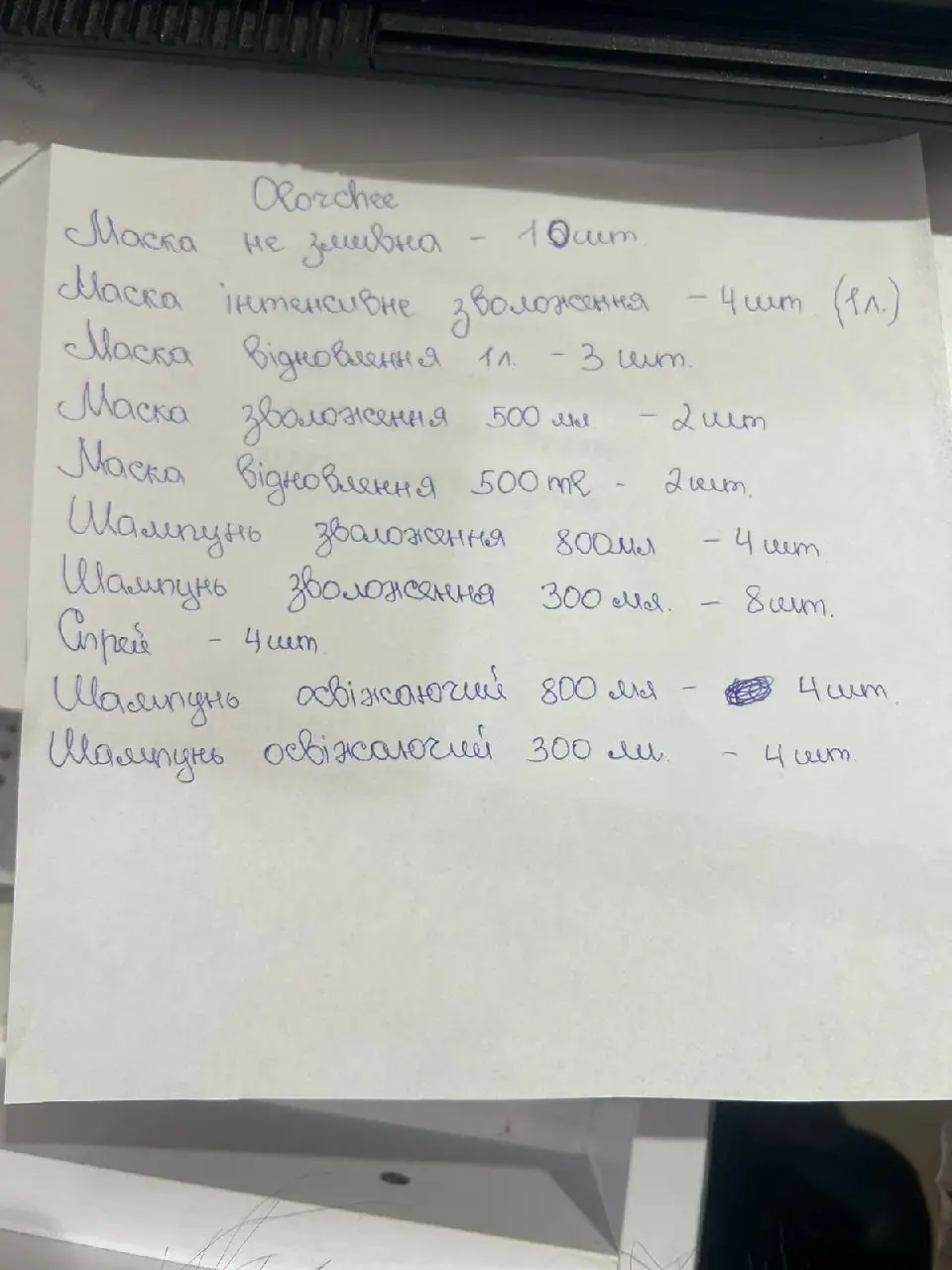
A real handwritten order: a list of hair-care masks, shampoos and a spray with sizes and quantities, photographed and sent in Telegram.
Sent as a photo in Telegram

Cosmetics distribution

From a handwritten list in Telegram to an order in 1C

Blum Beauty's shops send photos of lists like this one. Tarvyx reads each line, finds the product and size in the catalogue and prepares the order for checking.

  • 15-30 mina day on order entry, down from 2-4 hours
  • 213orders in the first 12 days
  • 94%of lines kept the product Tarvyx found
Read the Blum Beauty story

Furniture manufacturer

15-30min

per dealer order when it was typed by hand, at 15-20+ orders a day

Dealer orders now arrive ready to approve

The team sees the PDF next to the matched lines and checks only what is flagged. Up to 80% less time per order.

Read the case

What a sales order needs before the ERP takes it

An ERP is strict where a customer’s message is loose. Closing that gap is the whole job.

What the customer sends

  • A name that is not quite the account name

  • Product wording or a code that is theirs, not yours

  • A quantity in boxes where the system counts pieces

  • A delivery address in a signature or an earlier message

  • A date in the body that contradicts the attachment

What the ERP needs

  • An identified customer account

  • Lines that map to real products in the unit you sell in

  • A delivery address and a requested date

  • A reference that ties the order back to the customer’s document

  • An approval from a person who is accountable for it

From a customer’s message to a sales order

Nothing changes on the customer’s side. They send the order the way they already do.

01.

An order arrives, in any form

A customer order reaches you as an email, a PDF, a spreadsheet, a photo or a chat message.

02.

It becomes a structured request

Customer, delivery address, reference, dates and lines are read out of the message and its files.

03.

Lines are tied to your products

Each line is matched to a product in your catalogue and quantities are put in the unit you sell in.

04.

The order is checked before anyone sees it

Missing or conflicting details are flagged, and uncertain lines are held with the reason.

05.

A person approves, the ERP receives it

Your team approves the sales order and the record is pushed to the ERP.

The same path applies to every channel. Order entry automation looks at what that changes for the people on the desk, and Business Central orders describes the handoff to one specific ERP.

Which orders belong in automation, a portal or EDI

Not every order should go through the same door. Sorting them is part of getting value from any of them.

Keep on EDI or a portal

  • Partners that already send clean, structured orders every time

  • High-volume customers who are happy to use your portal

Route through Tarvyx

  • Orders that still arrive as free text, an attachment or a chat message

  • Customers who change their document layout without telling you

  • Customers who order in more than one language

  • The long tail that never justified an EDI project

What EDI covers, and how EDI order processing works, is explained in EDI orders.

What to look for in a sales order automation solution

The questions that decide whether automated sales order processing saves time or moves the typing into corrections, with the answers for Tarvyx.

RequirementWhy it mattersIn Tarvyx
Reads every formatOrders arrive as email text, PDFs, spreadsheets, photos and chatThe message and its attachments are read together as one order, with no template per customer
Matches to your catalogueA customer’s wording or code is not your item codeEvery line is matched to your products and customer records, across languages, and scored
Holds what is uncertainA silent guess becomes a wrong deliveryUncertain lines are held with the reason; close matches are suggested for one-click confirmation
Checks units and gapsBoxes against pieces, a missing address, a conflicting dateFlagged before anything reaches the ERP
Writes to your ERPA sales order nobody has to type againBusiness Central, Odoo, SAP Business One, 1C/BAS, or a REST API
Keeps approval in your handsSomeone stays accountable for every orderYour team approves, or auto-approval for fully matched orders from Growth
Predictable costPer-document fees grow with every orderFrom €149 a month by order volume, no per-message fees from Tarvyx

Priced by the orders you process. Your team included.

AI processing included, no per-message fees from Tarvyx. Order intake never stops. Prices in EUR, excluding VAT. Yearly payment 20% off.

  • Start€149a month · 300 orders a month · email plus two messengers · ready connectors you switch on yourself
  • Growth · most popular€249a month · 1,000 orders a month · all channels · ERP connection set up for you · auto-approval and order owners
  • Pro€449a month · 3,000 orders a month · connector adapted to your ERP · back-office modules 30% off
  • EnterpriseCustomFor high volumes · on-premise option · SLA

Where your order data is processed

Servers are in the EU on every plan, with the AI providers listed in our DPA, or you can run on-premise. Details: security and deployment.

Questions about sales order automation

What is sales order automation?

Sales order automation is creating the sales order in your ERP from the customer’s order without someone retyping it. For orders that arrive as emails, PDFs, spreadsheets, photos or chat messages, that means reading the order, tying every line to your catalogue, checking it and handing a validated record to the ERP.

What is automated sales order processing?

The same idea seen from the order desk: software creates the sales order from the customer’s order, and people only settle the exceptions and approve. With Tarvyx, fully matched orders can also approve automatically on Growth and above, so the desk works on the orders that need it.

What does a sales order need before the ERP will take it?

An identified customer, a delivery address, lines that map to real products in the unit you sell in, and dates that do not contradict each other. Tarvyx checks each of these and flags an order that fails one, with the gap named.

Can orders from different channels end up in one queue?

Yes. Email, WhatsApp, Telegram, Viber, Instagram and TikTok orders go through the same reading, matching and review, and land in the same queue with their source attached.

Does it create the sales order, or only a draft?

It hands your ERP a finished sales order once the order is approved, by your team or automatically for fully matched orders on Growth and above. In Odoo it arrives as a draft quotation that your team confirms there; in Business Central it is sent after a preview.

How is this different from order management inside the ERP?

An ERP’s order management starts when a structured order exists. Sales order automation covers the step before that: turning a free-form customer message into one. The ERP stays the system of record and Tarvyx does not replace it.

What does it cost?

Plans start at €149 a month for B2B order desks, priced by order volume, with AI processing and users included and no per-message fees from Tarvyx. On Growth and above we set up your ERP connection. Prices in EUR, excluding VAT.

How fast can we start?

Book a demo; a free pilot follows for desks from about 200 orders a month. Setup takes 1-5 working days and is done by us for free, then 14 days on your own orders with success criteria agreed upfront, and the first paid month refunded if they are not met.
See it on your own orders

Send a few real orders and tell us which ERP you run. In a 20-30 minute call we show the sales order Tarvyx would hand that ERP.

Order desk with ~200 orders a month or more? Ask about the free pilot

  • Your own orders, not a demo file
  • No change asked of a single buyer
  • 20-30 minutes, on orders like yours