How conversational order automation works
How order automation works, from message to ERP
Two workflows run side by side: the bot answers buyers and collects their orders, and every order is matched, checked and approved.
A 20-30 minute call on your own order formats. Free pilot for desks from ~200 orders a month.
Four steps, one order
Every order passes the same four steps. The buyer sees the first and the last; your team sees the whole order.
Talk
The buyer writes by email, in a messenger or under a post. Tarvyx answers and collects the order, even when it arrives as several messages.
Match
Each line is matched to your catalogue: product, size, pack and code, and checked against stock. The buyer is recognised from the message or the sender.
Check
What is unclear is asked in the chat with buttons, or flagged on the order for a person. Nothing uncertain is sent on.
Hand off
Your team approves. The order goes to your ERP or Tarvyx back office, and the buyer gets a confirmation and updates.
What Tarvyx does
- Multi-format order captureCapture orders from emails, PDFs, spreadsheets, messages and images.
- AI order extractionExtract products, quantities and other order details from incoming orders.
- Catalogue matchingMatch extracted order lines against your product catalogue.
- Order validationCheck order details and flag missing, inconsistent or unclear information.
- Clarification and human reviewAsk the buyer for clarification, or flag the cases your team should look at.
- ERP and back office hand-offSend approved orders to your ERP or Tarvyx back office.
Answer customer questions. Turn requests into orders.
Many orders start as a question. The bot answers it from your data and keeps the conversation going until there is an order. It also turns comments under a post into conversations, keeps a first message from someone new as a lead, and hands anything outside its remit to a person: see the AI sales assistant.
Buyer conversations
A question arrives
“How much?”, “Do you have it?”, “When can you deliver?”, on WhatsApp, Telegram, Viber, Instagram or TikTok.
Answered from your catalogue and FAQ
Prices from your catalogue, delivery and payment terms from your knowledge base. Nothing the bot was not given.
Stock checked
In stock or not, from your warehouse or ERP, before the buyer commits.
The order collected
Lines from several messages and photos, sizes asked with buttons, “anything else?” before it goes.
Confirmed
Once your team approves, the buyer gets a confirmation in the same chat.
Status and tracking
“Where is my order?” answered with the status and tracking number; the buyer is told when it ships.
Stop retyping customer orders
Whatever channel an order came through, it goes through the same checks before anything reaches your ERP.
Order processing
An order arrives
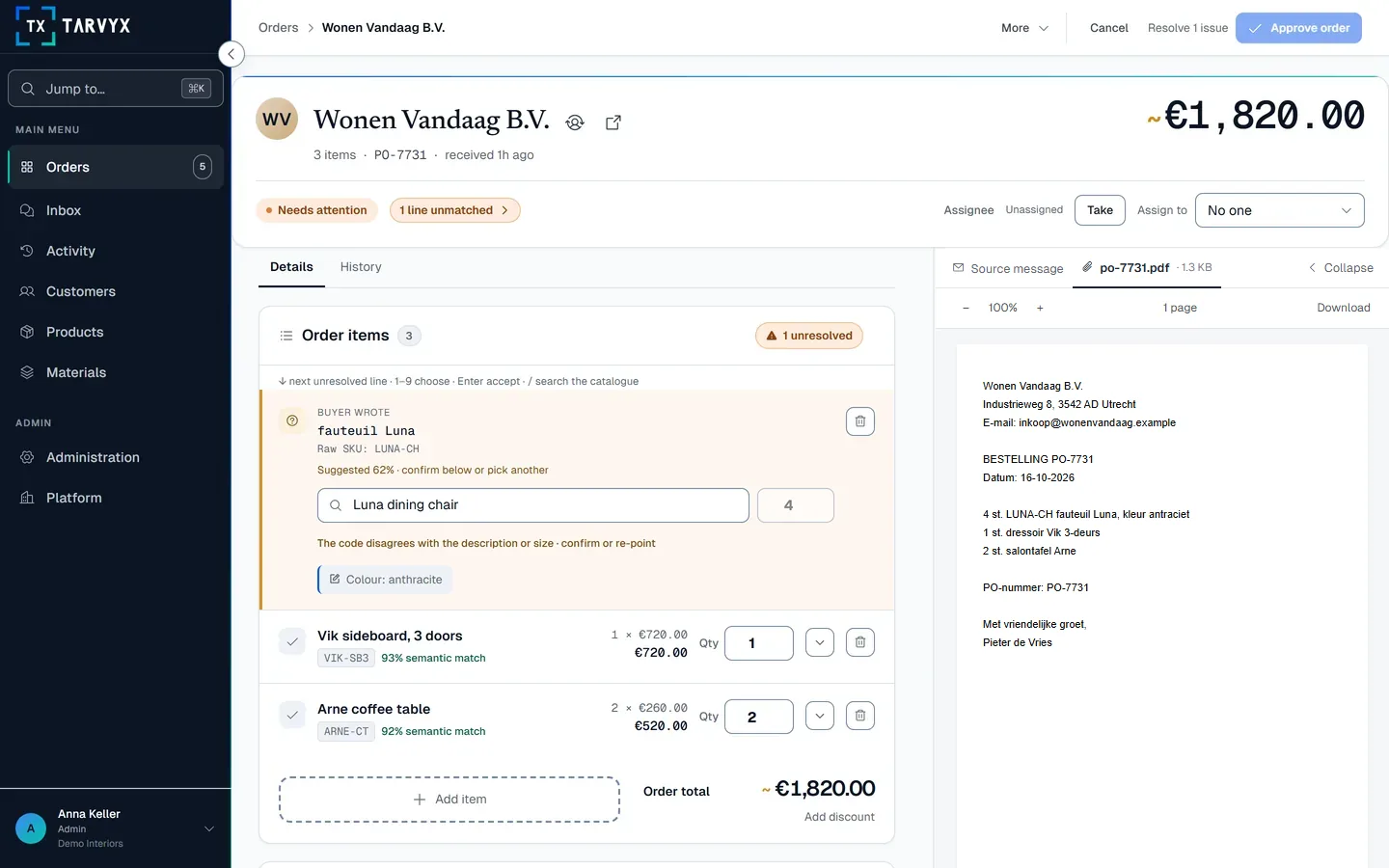
An email with a PDF or Excel, a photo of a handwritten note, or the order the bot collected in a chat.
Read
Message and attachments read together as one order, in any language, with no per-customer template.
Matched to catalogue and customer
Each line tied to your product, size, variant, pack and code; the buyer tied to a customer.
Checked
Missing address, a code that disagrees with the description, a pack count that does not divide, a size nobody stated.
Unclear lines asked or flagged
The buyer is asked in the chat, or the line is flagged for your team with the reason.
Your team approves, the ERP receives it
Approve, or let fully matched orders go through automatically. The order goes to Business Central, Odoo, SAP Business One, 1C/BAS, your API or Tarvyx back office.
Your team decides what goes out
Tarvyx prepares the order. It does not send on its own guess.
Only your words
The bot answers from your catalogue, warehouse and knowledge base. A price, date or link that is not in your text is never sent.
A person for anything uncertain
A line the system is not sure about is shown as a suggestion with the reason, never as a fact.
Approval before your ERP
Your team approves every order, unless you switch on automatic approval for fully matched orders.
Related terms: Product matching Order exception handling Touchless order processing
Questions about how it works
Do my buyers have to change how they order?
No. Buyers keep sending an email with a PDF, a list in Telegram or a message on Instagram or TikTok. Tarvyx reads the order where it arrives and answers in the same chat.
What happens when a line is unclear?
Tarvyx does not guess. It asks the buyer with buttons in the chat, or flags the line for your team with the reason. Anything it is not sure about waits for a person.
Who approves the order?
Your team. Tarvyx prepares an order matched to your catalogue, and a person approves it before it goes to your ERP or Tarvyx back office. On Growth and above, fully matched orders can be approved automatically.
Can one order arrive in several messages?
Yes. In a chat, messages, photos and files from the same buyer are gathered into one order, and the bot asks whether anything else should be added before the order goes to your team. A later email that adds to an earlier order is flagged, and your team merges the two.
What languages does Tarvyx read?
Orders are read and matched in the language they are written in, including mixed Cyrillic and Latin text. The bot answers in the language you set for each channel.
How long does setup take?
Usually one to five working days. We load your catalogue and customers and connect email and messengers. On Growth and above we also set up the ERP connector; on Start you switch on a ready connector yourself.
See it on your own orders
Tell us which ERP you run, and email a few real orders to sales@tarvyx.com if you like. In a 20-30 minute call we show Tarvyx reading orders like yours and matching their lines to a catalogue.
Order desk with ~200 orders a month or more? Ask about the free pilot
- Your own orders, not a demo file
- No change asked of a single buyer
- Set up in 1-5 working days; from Growth up we connect your ERP for you