Order entry automation
Order entry automation: from retyping to reviewing
Order entry automation, or automated order entry, replaces the step where someone reads a customer’s order and types it into the ERP. Tarvyx does that step, read, match, check, and leaves your team the part that needs judgement: approving the order and deciding the lines it is unsure about.
A 20-30 minute call on your own order formats. Free pilot for desks from ~200 orders a month.
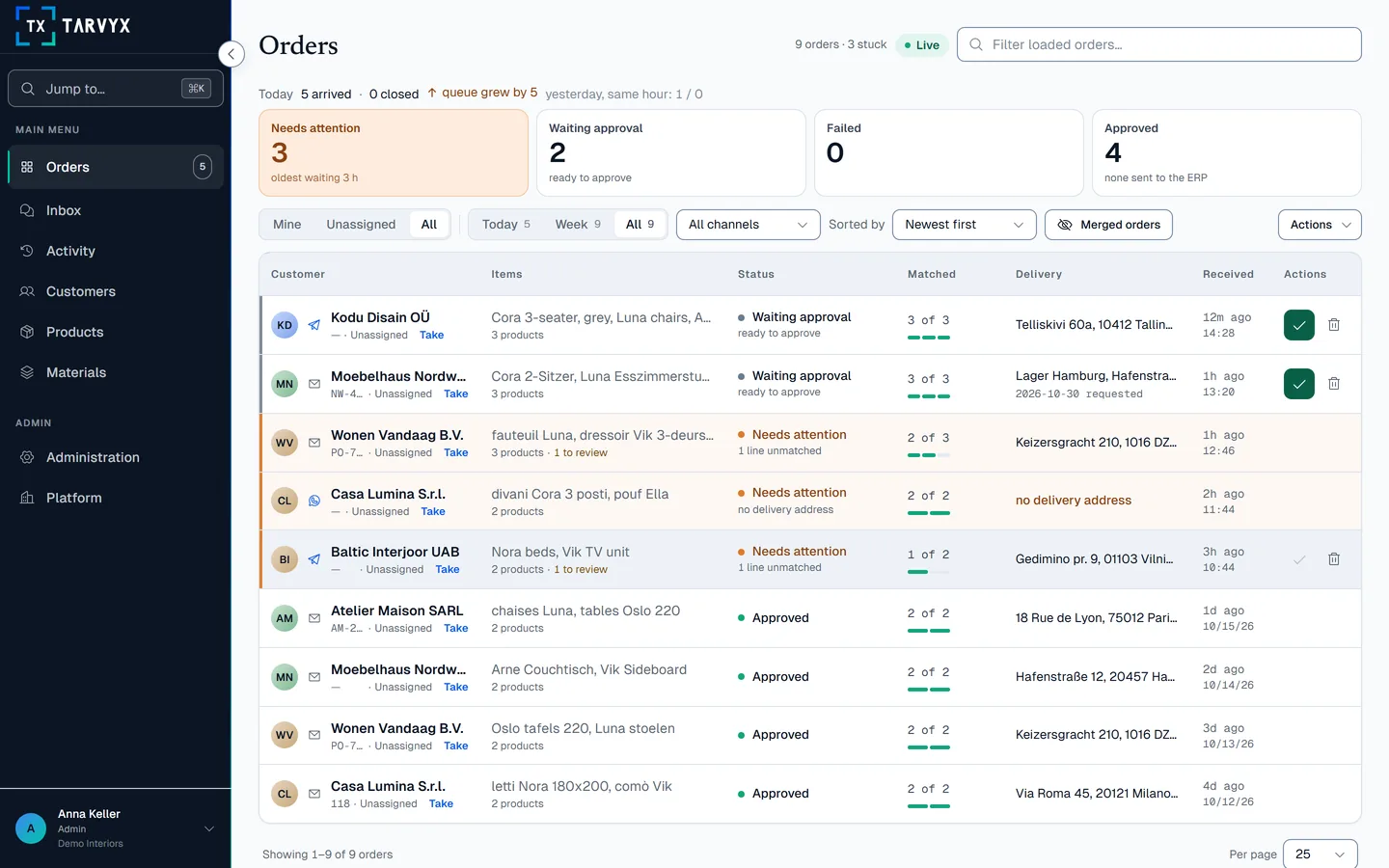
Where an order desk’s time actually goes
Typing is the visible part. Most of the minutes go on finding out what the order means.
What one order costs the desk
- Opening the message and every attachment to find the order
- Finding the customer account, often from a name that is spelled three ways
- Translating the customer’s product wording or codes into yours
- Converting boxes to pieces, or the other way round
- Chasing a missing delivery address or a date that contradicts the attachment
- Re-reading the whole order before saving it, because one wrong line is expensive
Manual vs automated order entry
The same order, step by step, with and without the reading and lookups automated.
| Step | Manual order entry | Automated order entry with Tarvyx |
|---|---|---|
| Finding the order | Opening the message and every attachment | Message and attachments read together as soon as they arrive |
| The customer | Looked up by hand | Matched by email address, verified chat identity or name, or flagged for your team |
| The products | The customer’s wording translated into your codes | Every line matched to your catalogue and scored |
| Units and pack sizes | Converted in someone’s head | Checked against the unit you sell in; an ambiguous quantity is held, not guessed |
| Into the ERP | Typed in, line by line | Pushed after approval |
| Time per order | 15-30 minutes in one furniture manufacturer | About 3-5 minutes to check and approve, exceptions included |
Times from one furniture deployment; method on the benchmarks page
Five steps from inbox to ERP
The customer keeps ordering the way they always have. Everything below happens on your side.
Orders land in one queue
Email, WhatsApp, Telegram, Viber, Instagram and TikTok orders arrive in one place instead of five inboxes.
Each one is read as a single request
The message and its attachments are read together, whatever the format.
Lines are matched and units checked
Every line is matched to your catalogue, and quantities are checked against the unit you sell in.
Exceptions come with the reason
A line the system cannot settle is held, with the source and the reason beside it.
One approval sends it
Your team approves a validated order, and the record is pushed to the ERP.
Most orders still start in a mailbox. In chat, the bot also answers your buyers about price, stock and order status. The email path in detail covers which formats are read and how a line is scored, and AI order processing explains the technique behind it.
What is automated, and what stays with people
A fit check is part of the demo; the line below is the one we hold to.
Automated
- Reading the message and its attachments as one request
- Identifying the customer and checking them against your catalogue, holding what it cannot settle
- Unit and pack-size checks against the catalogue
- Flagging missing or conflicting details
- Pushing the approved order to the ERP
Still a person
- Approving the order
- Deciding a line the system has held
- Special pricing, credit and other commercial judgement
- The relationship with the customer
Where your order data is processed
Servers are in the EU on every plan, with the AI providers listed in our DPA, or you can run on-premise. Details: security and deployment.
Questions about order entry automation
What exactly is automated in order entry?
The reading and the lookups: finding the order in the message or attachment, identifying the customer, matching each line to your catalogue, converting units, and checking for a missing delivery address or a conflicting date. What stays with your team is the decision: settling the lines the system is not sure about and approving the order, unless you let fully matched orders approve automatically.
Does order entry automation need clean master data?
It matches against your own catalogue and customer records, so the better those are, the more lines match without a question. It does not need to be perfect to start: a line that does not match is held with its reason, and the corrections your team makes are reused on later orders.
How are units and pack sizes handled?
Quantities are checked against the unit your catalogue sells in. When a customer writes a number that could mean pieces or packs, the order is held with that question attached rather than converted on a guess, because a wrong conversion reaches the ERP as a wrong quantity.
What happens to an order from a customer we have not seen before?
The sender is matched by email address, by a verified chat identity or by name. When none of those identifies a customer with confidence, the order is flagged for your team to confirm or create the customer, instead of being filed under the closest-sounding name.
Can the desk correct an order before it is sent?
Yes. Every field and line can be edited on the order before approval, with the source message and attachments beside it. Nothing is sent to the ERP until someone approves, unless you switch on automatic approval (Growth and above) for orders where every line is matched.
Is there a record of who changed what?
Yes. Changes to an order are recorded with who made them and when, so a corrected quantity can be traced back to the person and the moment.
What does it cost?
Plans start at €149 a month for B2B order desks, priced by order volume, with AI processing and users included and no per-message fees from Tarvyx. On Growth and above we set up your ERP connection. Prices in EUR, excluding VAT.
How long does it take to set up automated order entry?
Setup takes 1-5 working days, implementation included. We import your catalogue and customer records and connect the mailbox and chats; on Growth and above we also set up the ERP connection. Your customers change nothing about how they order.
Watch your own orders go through
Send a few orders your desk retyped last week. In a 20-30 minute call we compare what Tarvyx drafts with what your team entered.
Order desk with ~200 orders a month or more? Ask about the free pilot
- Your own orders, not a demo file
- No change asked of a single buyer
- 20-30 minutes, on orders like yours